在现代网页设计中,通知栏(Notification Bar)已经成为一种常见的用户体验优化手段。它可以帮助用户及时获取重要信息,提高用户的浏览效率和满意度。然而,如何打造一个丝滑、流畅的通知栏,却是一个不小的挑战。本文将介绍如何使用DeepSeek和Vue框架,打造一个丝滑的通知栏,提升用户体验。
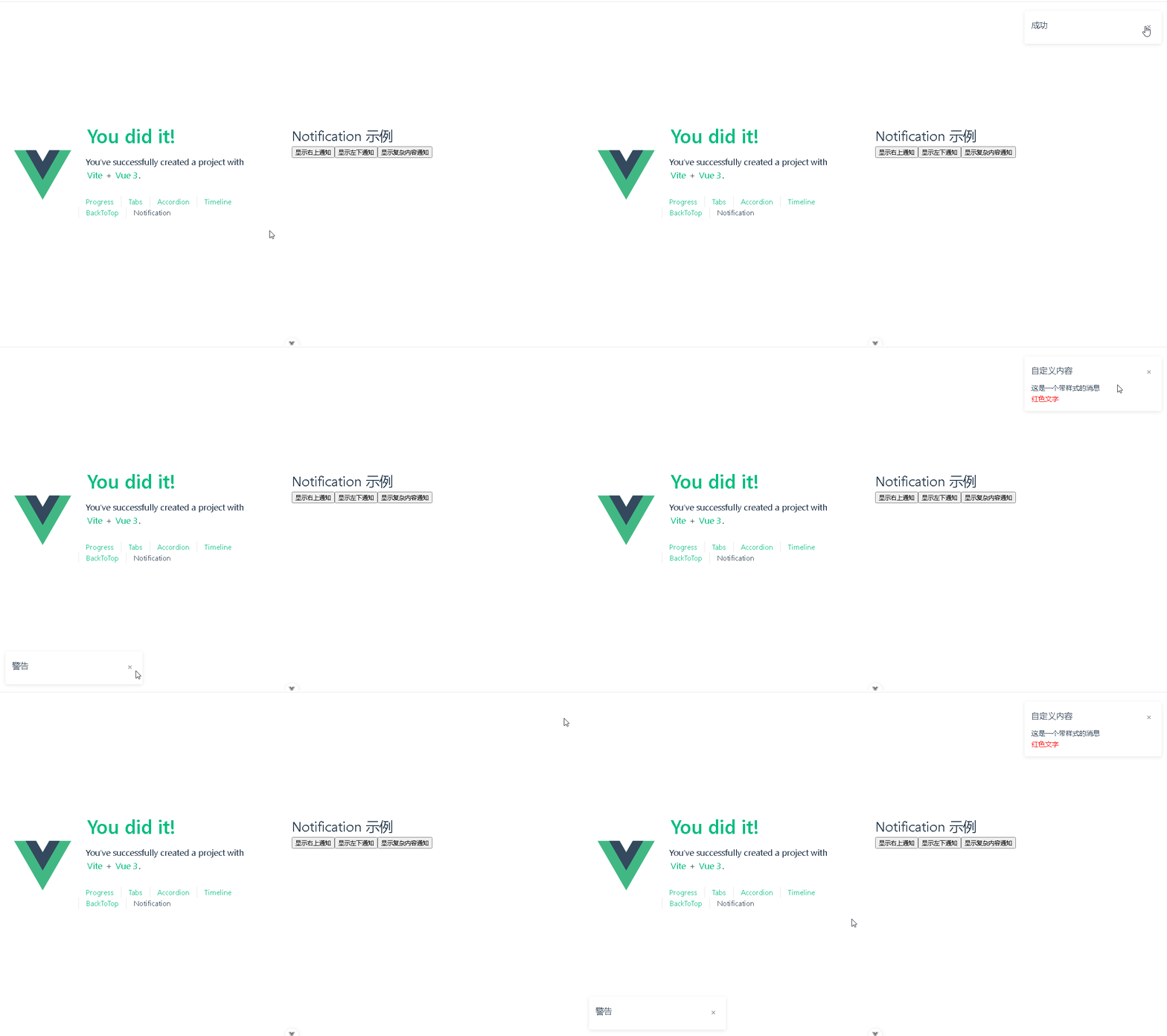
📚页面效果
📚指令输入
已经创建好了一个基于Vue3的组合式API的项目(Composition API),并能正常运行起来,请帮我用 Vue3的组合式API(Composition API) 生成一个 通知栏(Notification Bar)的功能组件,所有代码都保存在components/Notification 下的文件夹中。组件的script标签中只有setup属性,使用普通 JavaScript 实现,不使用TypeScript。
功能要有
如下属性:
| 名称 | 说明 | 类型 | 默认值 |
|---|---|---|---|
| title | 标题 | string | ‘’ |
| message | 通知栏正文内容 | string / VNode/ Function | ‘’ |
| duration | 显示时间, 单位为毫秒。 值为 0 则不会自动关闭 | number | 5000 |
| position | 自定义弹出位置 | enum 可选值为’topRight’, ‘topLeft’, ‘bottomRight’, ‘bottomLeft’ | 5000 |
| closeEndFn | 关闭时的回调函数 | Function | |
| clickEndFn | 点击 Notification 时的回调函数 | Function |
下面是现有目录
vueAndDeepseek/
├── src/ # 源代码目录
│ ├── assets/ # 静态资源
│ │ ├── base.css
│ │ ├── main.css
│ │ └── logo.svg
│ ├── components/ # 组件目录
│ │ ├── HelloWorld.vue
│ │ ├── TheWelcome.vue
│ │ ├── WelcomeItem.vue
│ │ ├── Progress/
│ │ │ └── Progress.vue
│ │ ├── Accordion/
│ │ ├── BackToTop/
│ │ ├── Notification/
│ │ ├── Timeline/
│ │ ├── Tabs/
│ │ └── icons/
│ ├── router/ # 路由配置
│ │ └── index.js
│ ├── stores/ # Pinia 状态管理
│ │ └── counter.js
│ ├── views/ # 页面组件
│ │ ├── ProgressView.vue
│ │ ├── TabsView.vue
│ │ ├── TimelineView.vue
│ │ ├── NotificationView.vue
│ │ ├── BackToTopView.vue
│ │ ├── AccordionView.vue
│ │ └── AboutView.vue
│ ├── App.vue # 根组件
│ └── main.js # 应用入口
├── public/ # 公共资源目录
├── index.html # HTML 模板
├── package.json # 项目配置
├── vite.config.js # Vite 配置
└── node_modules/ # 依赖包目录
📚think
📘根据提供的参数和项目结构,我为您实现 Notification 组件。以下是分步骤的解决方案:
首先在 components/Notification 目录中创建核心组件:
<!-- Notification.vue -->
<template>
  <div
    :class="['notification', positionClass]"
    @click="handleClick"
  >
    <div class="header">
      <h3>{{ title }}</h3>
      <span   @click.stop="close">×</span>
    </div>
    <div class="content">
      <component :is="messageContent"/>
    </div>
  </div>
</template>

<script setup>
import { computed, ref, onMounted } from 'vue'

const props = defineProps({
  title: { type: String, default: '' },
  message: { type: [String, Object, Function], default: '' },
  duration: { type: Number, default: 5000 },
  position: {
    type: String,
    default: 'topRight',
    validator: (value) => ['topRight', 'topLeft', 'bottomRight', 'bottomLeft'].includes(value)
  },
  closeEndFn: { type: Function },
  clickEndFn: { type: Function }
})

const positionClass = computed(() => `notification-${props.position}`)
const messageContent = computed(() => {
  if (typeof props.message === 'function') return props.message()
  return props.message
})

const timer = ref(null)

onMounted(() => {
  if (props.duration > 0) {
    timer.value = setTimeout(close, props.duration)
  }
})

const close = () => {
  clearTimeout(timer.value)
  if (props.closeEndFn) props.closeEndFn()
}

const handleClick = () => {
  if (props.clickEndFn) props.clickEndFn()
}
</script>

<style scoped>
.notification {
  position: fixed;
  width: 300px;
  padding: 15px;
  background: white;
  box-shadow: 0 2px 8px rgba(0,0,0,0.1);
  border-radius: 4px;
  transition: all 0.3s;
}

.notification-topRight {
  top: 20px;
  right: 20px;
}

.notification-topLeft {
  top: 20px;
  left: 20px;
}

.notification-bottomRight {
  bottom: 20px;
  right: 20px;
}

.notification-bottomLeft {
  bottom: 20px;
  left: 20px;
}

.header {
  display: flex;
  justify-content: space-between;
  align-items: center;
  margin-bottom: 10px;
}

.close-btn {
  cursor: pointer;
  font-size: 20px;
  padding: 0 5px;
}

.content {
  word-break: break-word;
}
</style>
在 views/NotificationView.vue 中添加演示示例:
<template>
  <div class="notification-demo">
    <h1>Notification 示例</h1>

    <button @click="showTopRight">显示右上通知</button>
    <button @click="showBottomLeft">显示左下通知</button>
    <button @click="showCustomMessage">显示复杂内容通知</button>
  </div>
</template>

<script setup>
import { h } from 'vue'
import Notification from '@/components/Notification/Notification.vue'

const showTopRight = () => {
  createNotification({
    title: '成功',
    message: '操作已成功完成',
    position: 'topRight',
    duration: 3000
  })
}

const showBottomLeft = () => {
  createNotification({
    title: '警告',
    message: '系统即将维护',
    position: 'bottomLeft',
    duration: 0  // 不自动关闭
  })
}

const showCustomMessage = () => {
  createNotification({
    title: '自定义内容',
    message: () => h('div', [
      h('p', '这是一个带样式的消息'),
      h('p', { style: 'color: red' }, '红色文字')
    ]),
    clickEndFn: () => console.log('通知被点击')
  })
}

// 创建通知的通用方法
const createNotification = (options) => {
  // 实际应用中应该使用更复杂的挂载逻辑
  const container = document.createElement('div')
  document.body.appendChild(container)

  const { closeEndFn } = options

  const extendedOptions = {
    ...options,
    closeEndFn: () => {
      closeEndFn?.()
      container.remove()
    }
  }

  createApp(Notification, extendedOptions).mount(container)
}
</script>
需要优化的地方:
使用 Teleport 优化挂载位置:
<template>
  <Teleport to="body">
    <div :class="['notification', positionClass]">
      <!-- 内容 -->
    </div>
  </Teleport>
</template>
添加动画效果(在 CSS 中添加):
.notification-enter-active,
.notification-leave-active {
  transition: all 0.3s ease;
}

.notification-enter-from,
.notification-leave-to {
  opacity: 0;
  transform: translateX(100%);
}
参数验证增强:
props: {
  duration: {
    type: Number,
    default: 5000,
    validator: (value) => value >= 0
  },
  // 其他 props...
}
这个实现方案包含以下关键点:
支持所有列出的参数配置
处理不同内容类型(字符串、VNode、函数)
实现不同位置的定位
支持永久显示(duration=0)
包含点击和关闭回调
使用 Composition API 实现
包含基本动画效果
注意:实际应用中可能需要使用更健壮的挂载机制(如全局通知队列管理系统),并添加 z-index 管理、多个通知的堆叠排列等功能。
总结
通过本文的介绍,我们学会了如何使用DeepSeek和Vue框架,打造一个丝滑的通知栏。DeepSeek可以帮助我们轻松实现通知栏的平滑过渡和动画效果,而Vue框架则为我们提供了强大的数据绑定和组件化开发能力。通过这两者的结合,我们可以轻松实现一个既美观又实用的通知栏,提升用户的浏览体验。希望本文的内容能对你有所帮助,祝你在网页设计的道路上越走越远,取得辉煌的成绩!
本文来源于#宝码香车,由@蜜芽 整理发布。如若内容造成侵权/违法违规/事实不符,请联系本站客服处理!
该文章观点仅代表作者本人,不代表本站立场。本站不承担相关法律责任。
如若转载,请注明出处:https://www.zhanid.com/biancheng/3404.html