在现代Web应用中,标签输入(Tag Input)是一种常见且重要的输入组件。它通过允许用户输入并添加多个标签,使得内容分类和搜索变得更加便捷和高效。无论是社交媒体平台、内容管理系统还是电子商务网站,标签输入都得到了广泛应用。然而,实现一个高效、易用且美观的标签输入组件并非易事。本文将介绍如何使用DeepSeek和Vue框架,打造一个丝滑流畅的标签输入组件,为用户提供极致的输入体验。
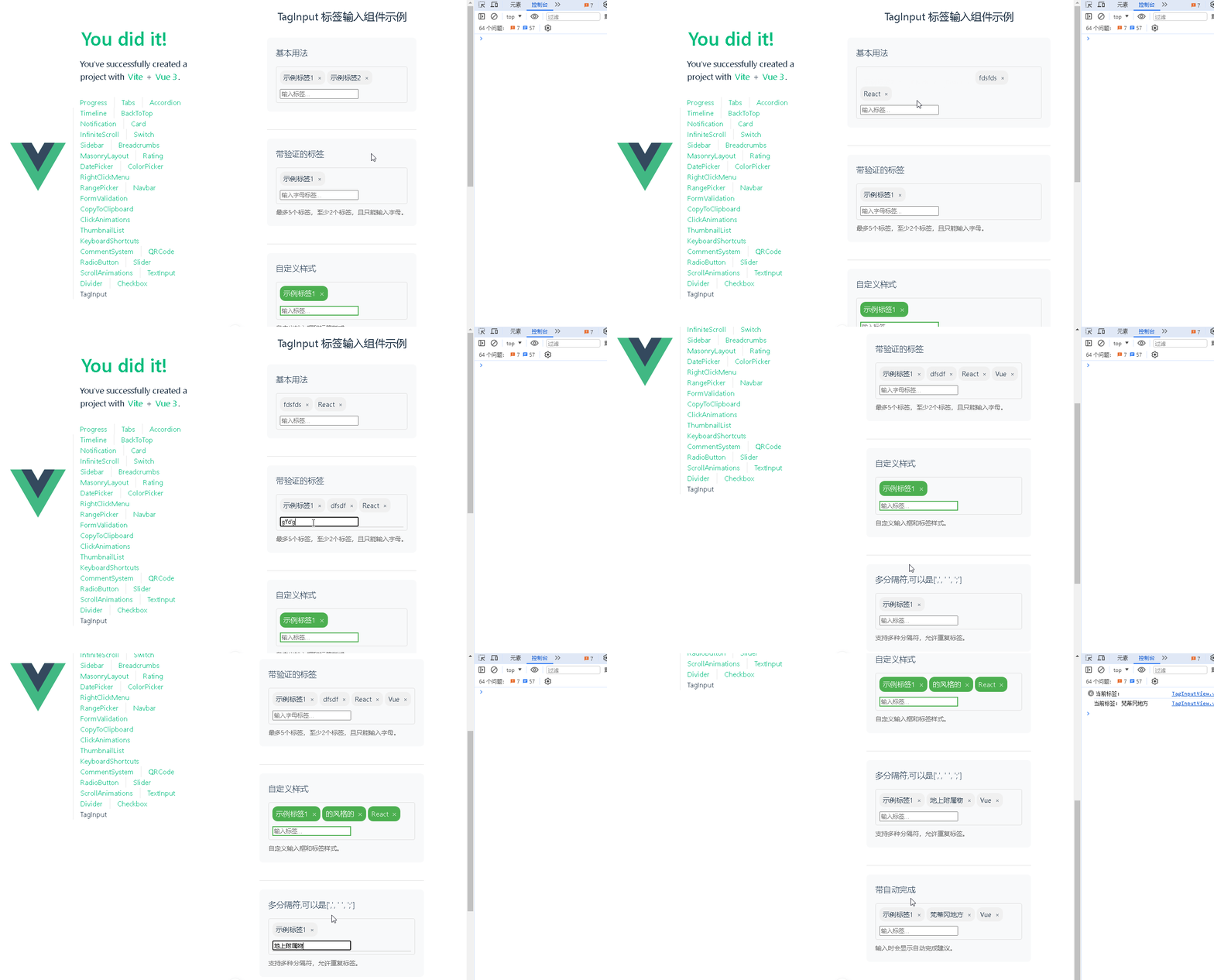
📚页面效果
📚指令输入
1. 标签输入(Tag Input)
已经创建好了一个基于Vue3的组合式API的项目(Composition API),并能正常运行起来,请帮我用 Vue3的组合式API(Composition API) 生成一个 标签输入(Tag Input) 的功能组件,所有代码都保存在components/TagInput 下的文件夹中。功能组件的script标签中只有setup属性,使用普通 JavaScript 实现,不使用TypeScript。
功能要有,如下属性:
属性定义
数据相关属性
modelValue
类型:Array
作用:用于双向数据绑定,存储当前输入的标签列表。
tags
类型:Array
作用:初始化标签列表,可用于预设一些标签。
maxTags
类型:Number
作用:限制最多能输入的标签数量。
minTags
类型:Number
作用:限制最少需要输入的标签数量。
输入相关属性
placeholder
类型:String
作用:输入框的占位提示文本。
separator
类型:String 或 Array
作用:指定标签的分隔符,如逗号、空格等,用户输入时以此分隔不同标签。
allowDuplicates
类型:Boolean
作用:是否允许输入重复的标签。
样式相关属性
size
类型:String,可选值如 'small', 'medium', 'large'
作用:控制组件的大小。
inputStyle
类型:Object 或 String
作用:自定义输入框的样式。
tagStyle
类型:Object 或 String
作用:自定义标签的样式。
验证相关属性
pattern
类型:RegExp 或 String
作用:用于验证输入的标签是否符合特定的正则表达式。
maxLength
类型:Number
作用:限制单个标签的最大长度。
事件定义
update:modelValue
作用:当标签列表发生变化时触发,用于更新 modelValue 的值,实现双向数据绑定。
add
作用:当成功添加一个新标签时触发,传递新添加的标签作为参数。
remove
作用:当成功移除一个标签时触发,传递被移除的标签作为参数。
input
作用:输入框内容发生变化时触发,可用于实时验证或处理输入内容。
blur
作用:输入框失去焦点时触发。
focus
作用:输入框获得焦点时触发。
其他
组件设计
支持删除动画:为标签的删除操作添加动画效果,提升用户体验。
可编辑标签:允许用户双击标签进行编辑,增强交互性。
自动完成功能:提供自动完成建议,根据用户输入的内容从预设列表中匹配并提示。
支持键盘操作:如使用回车键添加标签,使用删除键删除标签等,方便用户操作。
文档和示例
详细文档:提供清晰的组件文档,包括属性说明、事件说明、使用示例等,方便其他开发者使用。
在线示例:提供在线的代码示例,让开发者可以直观地看到组件的效果和使用方法。
你有更好的建议也可以添加,要注明。组件定义好后给出5个及以上的调用示例。
下面是现有目录
vueAndDeepseek/
├── src/ # 源代码目录
│ ├── assets/ # 静态资源
│ │ ├── base.css
│ │ ├── main.css
│ │ └── logo.svg
│ ├── components/ # 组件目录
│ │ ├── HelloWorld.vue
│ │ ├── TheWelcome.vue
│ │ ├── WelcomeItem.vue
│ │ ├── Progress/
│ │ │ └── Progress.vue
│ │ ├── Accordion/
│ │ ├── BackToTop/
│ │ ├── Card/
│ │ ├── InfiniteScroll/
│ │ ├── Notification/
│ │ ├── Timeline/
│ │ ├── Switch/
│ │ ├── Tabs/
│ │ ├── Sidebar/
│ │ ├── Breadcrumbs/
│ │ ├── MasonryLayout/
│ │ ├── Rating/
│ │ ├── ColorPicker/
│ │ ├── RightClickMenu/
│ │ ├── RangePicker/
│ │ ├── Navbar/
│ │ ├── FormValidation/
│ │ ├── CopyToClipboard/
│ │ ├── ClickAnimations/
│ │ ├── ThumbnailList/
│ │ ├── KeyboardShortcuts/
│ │ ├── CommentSystem/
│ │ ├── QRCode/
│ │ ├── RadioButton/
│ │ ├── Slider/
│ │ ├── ScrollAnimations/
│ │ ├── TextInput/
│ │ ├── Divider/
│ │ ├── Checkbox/
│ │ ├── TagInput/
│ │ ├── DatePicker/
│ │ └── icons/
│ ├── router/ # 路由配置
│ │ └── index.js
│ ├── stores/ # Pinia 状态管理
│ │ └── counter.js
│ ├── views/ # 页面组件
│ │ ├── ProgressView.vue
│ │ ├── TabsView.vue
│ │ ├── SwitchView.vue
│ │ ├── TimelineView.vue
│ │ ├── NotificationView.vue
│ │ ├── CardView.vue
│ │ ├── InfiniteScrollView.vue
│ │ ├── BackToTopView.vue
│ │ ├── AccordionView.vue
│ │ ├── SidebarView.vue
│ │ ├── BreadcrumbsView.vue
│ │ ├── MasonryLayoutView.vue
│ │ ├── RatingView.vue
│ │ ├── ColorPickerView.vue
│ │ ├── RightClickMenuView.vue
│ │ ├── RangePickerView.vue
│ │ ├── NavbarView.vue
│ │ ├── FormValidationView.vue
│ │ ├── CopyToClipboardView.vue
│ │ ├── ClickAnimationsView.vue
│ │ ├── ThumbnailListView.vue
│ │ ├── KeyboardShortcutsView.vue
│ │ ├── CommentSystemView.vue
│ │ ├── QRCodeView.vue
│ │ ├── RadioButtonView.vue
│ │ ├── SliderView.vue
│ │ ├── ScrollAnimationsView.vue
│ │ ├── TextInputView.vue
│ │ ├── DividerView.vue
│ │ ├── CheckboxView.vue
│ │ ├── TagInputView.vue
│ │ ├── DatePickerView.vue
│ │ └── AboutView.vue
│ ├── App.vue # 根组件
│ └── main.js # 应用入口
├── public/ # 公共资源目录
├── index.html # HTML 模板
├── package.json # 项目配置
├── vite.config.js # Vite 配置
└── node_modules/ # 依赖包目录
📚think
📘组件代码
根据你的需求,我帮你创建了 TagInput 组件。以下是详细的实现步骤和调用示例:
组件代码 components/TagInput/TagInput.vue
<template>
<div :class="size && `tag-input--${size}`">
<!-- 标签容器(带动画) -->
<transition-group name="tag-list" tag="div" class="tag-container">
<div
v-for="(tag, index) in innerTags"
:key="tag + index"
:
>
<!-- 可编辑标签 -->
<span
v-if="editingIndex !== index"
@dblclick="handleEditTag(index)"
>{{ tag }}</span>
<input
v-else
v-model="editingValue"
@keydown.enter="handleEditConfirm(index)"
@blur="handleEditConfirm(index)"
@keydown.esc="editingIndex = -1"
/>
<!-- 删除按钮 -->
<span @click="removeTag(index)" class="tag-remove">×</span>
</div>
</transition-group>
<!-- 输入框 + 自动完成 -->
<div class="input-wrapper">
<input
ref="inputRef"
v-model="inputValue"
:placeholder="filteredPlaceholder"
:
@keydown="handleKeydown"
@input="handleInput"
@focus="$emit('focus')"
@blur="$emit('blur')"
/>
<transition name="fade">
<div v-if="suggestionsVisible" class="suggestions">
<div
v-for="(suggestion, idx) in filteredSuggestions"
:key="idx"
@click="selectSuggestion(suggestion)"
>{{ suggestion }}</div>
</div>
</transition>
</div>
</div>
</template>
<script setup>
import { ref, computed, watch, nextTick } from 'vue'
const props = defineProps({
modelValue: { type: Array, default: () => [] },
tags: { type: Array, default: () => [] },
maxTags: Number,
minTags: Number,
placeholder: { type: String, default: '输入标签...' },
separator: { type: [String, Array], default: ',' },
allowDuplicates: Boolean,
size: String,
inputStyle: [Object, String],
tagStyle: [Object, String],
pattern: [RegExp, String],
maxLength: Number
})
const emit = defineEmits([
'update:modelValue',
'add',
'remove',
'input',
'blur',
'focus'
])
// 响应式数据
const inputRef = ref(null)
const inputValue = ref('')
const innerTags = ref([...props.modelValue.length ? props.modelValue : props.tags])
const editingIndex = ref(-1)
const editingValue = ref('')
const suggestionsVisible = ref(false)
// 计算属性
const filteredPlaceholder = computed(() => {
if (props.maxTags && innerTags.value.length >= props.maxTags) {
return '已达到最大标签数量'
}
return props.placeholder
})
const filteredSuggestions = computed(() => {
// 实际项目中应从 props 接收建议数据,这里做简单演示
const demoData = ['Vue', 'React', 'Angular', 'Svelte', 'JavaScript']
return demoData.filter(item =>
item.toLowerCase().includes(inputValue.value.toLowerCase())
)
})
// 方法
const validateTag = (tag) => {
tag = tag.trim()
if (!tag) return false
if (props.maxLength && tag.length > props.maxLength) return false
if (props.pattern) {
const pattern = typeof props.pattern === 'string'
? new RegExp(props.pattern)
: props.pattern
if (!pattern.test(tag)) return false
}
return true
}
const addTag = (tag) => {
tag = tag.trim()
if (!validateTag(tag)) return
if (props.maxTags && innerTags.value.length >= props.maxTags) return
if (!props.allowDuplicates && innerTags.value.includes(tag)) return
innerTags.value.push(tag)
emit('update:modelValue', [...innerTags.value])
emit('add', tag)
}
const removeTag = (index) => {
if (props.minTags && innerTags.value.length <= props.minTags) return
const removed = innerTags.value.splice(index, 1)
emit('update:modelValue', [...innerTags.value])
emit('remove', removed[0])
}
const handleKeydown = (e) => {
const separators = Array.isArray(props.separator)
? props.separator
: [props.separator]
if (e.key === 'Enter' || separators.includes(e.key)) {
e.preventDefault()
processInput()
} else if (e.key === 'Backspace' && inputValue.value === '') {
removeTag(innerTags.value.length - 1)
}
}
const processInput = () => {
const separators = Array.isArray(props.separator)
? props.separator.join('')
: props.separator
const splitRegExp = new RegExp(`[${separators}]`)
inputValue.value.split(splitRegExp)
.filter(t => t.trim())
.forEach(t => addTag(t))
inputValue.value = ''
}
const handleInput = () => {
suggestionsVisible.value = inputValue.value.length > 0
emit('input', inputValue.value)
}
const handleEditTag = async (index) => {
editingIndex.value = index
editingValue.value = innerTags.value[index]
await nextTick()
inputRef.value.focus()
}
const handleEditConfirm = (index) => {
if (validateTag(editingValue.value)) {
innerTags.value.splice(index, 1, editingValue.value.trim())
emit('update:modelValue', [...innerTags.value])
}
editingIndex.value = -1
}
const selectSuggestion = (suggestion) => {
addTag(suggestion)
inputValue.value = ''
suggestionsVisible.value = false
}
// 监听
watch(() => props.modelValue, (newVal) => {
innerTags.value = [...newVal]
})
</script>
<style scoped>
.tag-input {
border: 1px solid #ddd;
padding: 8px;
border-radius: 4px;
}
.tag-input--small { font-size: 12px }
.tag-input--medium { font-size: 14px }
.tag-input--large { font-size: 16px }
.tag-container {
display: flex;
flex-wrap: wrap;
gap: 4px;
margin-bottom: 8px;
}
.tag-item {
background: #f0f0f0;
padding: 4px 8px;
border-radius: 12px;
display: flex;
align-items: center;
gap: 4px;
}
.tag-remove {
cursor: pointer;
padding-left: 4px;
}
.tag-remove:hover {
color: #f00;
}
.tag-edit-input {
border: none;
outline: none;
background: transparent;
font: inherit;
}
.input-wrapper {
position: relative;
}
.suggestions {
position: absolute;
background: white;
border: 1px solid #ddd;
width: 100%;
max-height: 200px;
overflow-y: auto;
z-index: 100;
}
.suggestion-item {
padding: 8px;
cursor: pointer;
}
.suggestion-item:hover {
background: #f0f0f0;
}
/* 过渡动画 */
.tag-list-enter-active,
.tag-list-leave-active {
transition: all 0.3s ease;
}
.tag-list-enter-from,
.tag-list-leave-to {
opacity: 0;
transform: translateY(10px);
}
.fade-enter-active,
.fade-leave-active {
transition: opacity 0.2s;
}
.fade-enter-from,
.fade-leave-to {
opacity: 0;
}
</style>5个调用示例
<!-- 基本使用 -->
<TagInput v-model="tags" />

<!-- 带验证的标签 -->
<TagInput
  v-model="tags"
  :max-tags="5"
  :min-tags="2"
  :pattern="/^[a-zA-Z]+$/"
  placeholder="输入字母..."
/>

<!-- 自定义样式 -->
<TagInput
  v-model="tags"
  size="large"
  :input-style="{ border: '2px solid #4CAF50' }"
  :tag-style="{ background: '#4CAF50', color: 'white' }"
/>

<!-- 多分隔符 -->
<TagInput
  v-model="tags"
  :separator="[',', ' ', ';']"
  :allow-duplicates="true"
/>

<!-- 带自动完成 -->
<TagInput
  v-model="tags"
  @input="handleInput"
  :max-length="20"
/>
增强建议
键盘导航增强:
添加方向键在建议列表中导航
添加 Tab 键选择建议
输入验证反馈:
添加无效输入的视觉反馈
提供验证错误消息插槽
扩展自动完成:
添加异步搜索建议功能
支持自定义建议模板
增强可访问性:
添加 ARIA 标签
支持键盘完全操作
性能优化:
添加虚拟滚动支持长建议列表
防抖输入处理
这些功能可以根据实际需求逐步添加。组件已经实现了核心功能,可以满足大多数使用场景。
📚代码测试
运行正常
📚测试代码正常跑通,附其他基本代码
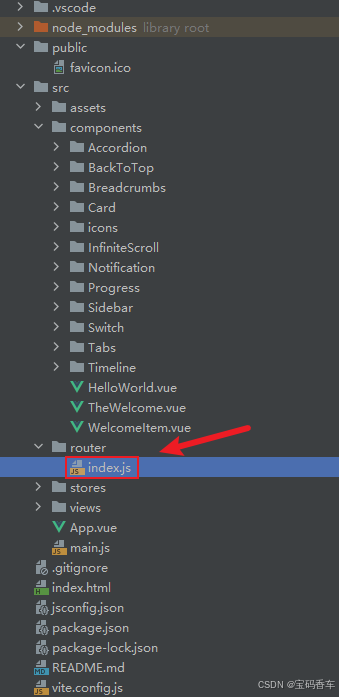
添加路由
页面展示入口
📘编写路由 src\router\index.js
import { createRouter, createWebHistory } from 'vue-router'
import RightClickMenuView from '../views/RightClickMenuView.vue'
import RangePickerView from '../views/RangePickerView.vue'


const router = createRouter({
  history: createWebHistory(import.meta.env.BASE_URL),
  routes: [
    {
      path: '/',
      name: 'progress',
      component:  () => import('../views/ProgressView.vue'),
    },
    {
      path: '/tabs',
      name: 'tabs',
      // route level code-splitting
      // this generates a separate chunk (About.[hash].js) for this route
      // which is lazy-loaded when the route is visited.
      // 标签页(Tabs)
      component: () => import('../views/TabsView.vue'),
    },
    {
      path: '/accordion',
      name: 'accordion',
      // 折叠面板(Accordion)
      component: () => import('../views/AccordionView.vue'),
    },
    {
      path: '/timeline',
      name: 'timeline',
      // 时间线(Timeline)
      component: () => import('../views/TimelineView.vue'),
    },
    {
      path: '/backToTop',
      name: 'backToTop',
      component: () => import('../views/BackToTopView.vue')
    },
    {
      path: '/notification',
      name: 'notification',
      component: () => import('../views/NotificationView.vue')
    },
    {
      path: '/card',
      name: 'card',
      component: () => import('../views/CardView.vue')
    },
    {
      path: '/infiniteScroll',
      name: 'infiniteScroll',
      component: () => import('../views/InfiniteScrollView.vue')
    },
    {
      path: '/switch',
      name: 'switch',
      component: () => import('../views/SwitchView.vue')
    },
    {
      path: '/sidebar',
      name: 'sidebar',
      component: () => import('../views/SidebarView.vue')
    },
    {
      path: '/breadcrumbs',
      name: 'breadcrumbs',
      component: () => import('../views/BreadcrumbsView.vue')
    },
    {
      path: '/masonryLayout',
      name: 'masonryLayout',
      component: () => import('../views/MasonryLayoutView.vue')
    },
    {
      path: '/rating',
      name: 'rating',
      component: () => import('../views/RatingView.vue')
    },
    {
      path: '/datePicker',
      name: 'datePicker',
      component: () => import('../views/DatePickerView.vue')
    },
    {
      path: '/colorPicker',
      name: 'colorPicker',
      component: () => import('../views/ColorPickerView.vue')
    },
    {
      path: '/rightClickMenu',
      name: 'rightClickMenu',
      component: RightClickMenuView
    },
    {
      path: '/rangePicker',
      name: 'rangePicker',
      component: () => import('../views/RangePickerView.vue')
    },
    {
      path: '/navbar',
      name: 'navbar',
      component: () => import('../views/NavbarView.vue')
    },
    {
      path: '/formValidation',
      name: 'formValidation',
      component: () => import('../views/FormValidationView.vue')
    },
    {
      path: '/copyToClipboard',
      name: 'copyToClipboard',
      component: () => import('../views/CopyToClipboardView.vue')
    },
    {
      path: '/clickAnimations',
      name: 'clickAnimations',
      component: () => import('../views/ClickAnimationsView.vue')
    },
    {
      path: '/thumbnailList',
      name: 'thumbnailList',
      component: () => import('../views/ThumbnailListView.vue')
    },
    {
      path: '/keyboardShortcuts',
      name: 'keyboardShortcuts',
      component: () => import('../views/KeyboardShortcutsView.vue')
    },
    {
      path: '/commentSystem',
      name: 'commentSystem',
      component: () => import('../views/CommentSystemView.vue')
    },
    {
      path: '/qRCode',
      name: 'qRCode',
      component: () => import('../views/QRCodeView.vue')
    },
    {
      path: '/radioButton',
      name: 'radioButton',
      component: () => import('../views/RadioButtonView.vue')
    },
    {
      path: '/slider',
      name: 'slider',
      component: () => import('../views/SliderView.vue')
    },
    {
      path: '/scrollAnimations',
      name: 'scrollAnimations',
      component: () => import('../views/ScrollAnimationsView.vue')
    },
    {
      path: '/textInputView',
      name: 'textInputView',
      component: () => import('../views/TextInputView.vue')
    },
    {
      path: '/divider',
      name: 'divider',
      component: () => import('../views/DividerView.vue')
    },
    {
      path: '/checkbox',
      name: 'checkbox',
      component: () => import('../views/CheckboxView.vue')
    },
    {
      path: '/tagInput',
      name: 'tagInput',
      component: () => import('../views/TagInputView.vue')
    }
  ],
})

export default router
📘编写展示入口 src\App.vue
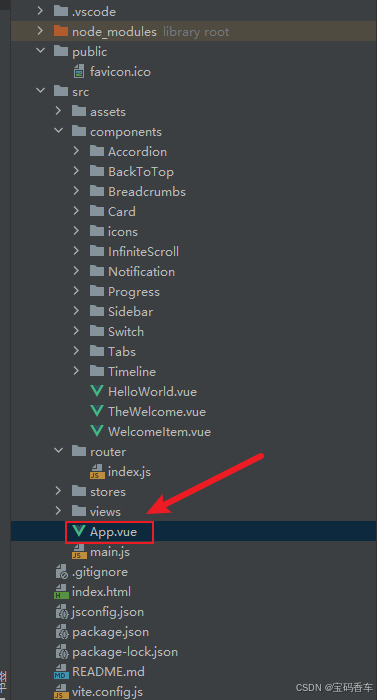
<script setup>
import { RouterLink, RouterView } from 'vue-router'
import HelloWorld from './components/HelloWorld.vue'
</script>

<template>
  <header>
    <img alt="Vue logo"   src="https://blog.csdn.net/qq_33650655/article/details/@/assets/logo.svg"     />

    <div class="wrapper">
      <HelloWorld msg="You did it!" />
      <nav>
        <RouterLink to="/">Progress</RouterLink>
        <RouterLink to="/tabs">Tabs</RouterLink>
        <RouterLink to="/accordion">Accordion</RouterLink>
        <RouterLink to="/timeline">Timeline</RouterLink>
        <RouterLink to="/backToTop">BackToTop</RouterLink>
        <RouterLink to="/notification">Notification</RouterLink>
        <RouterLink to="/card">Card</RouterLink>
        <RouterLink to="/infiniteScroll">InfiniteScroll</RouterLink>
        <RouterLink to="/switch">Switch</RouterLink>
        <RouterLink to="/sidebar">Sidebar</RouterLink>
        <RouterLink to="/breadcrumbs">Breadcrumbs</RouterLink>
        <RouterLink to="/masonryLayout">MasonryLayout</RouterLink>
        <RouterLink to="/rating">Rating</RouterLink>
        <RouterLink to="/datePicker">DatePicker</RouterLink>
        <RouterLink to="/colorPicker">ColorPicker</RouterLink>
        <RouterLink to="/rightClickMenu">RightClickMenu</RouterLink>
        <RouterLink to="/rangePicker">RangePicker</RouterLink>
        <RouterLink to="/navbar">Navbar</RouterLink>
        <RouterLink to="/formValidation">FormValidation</RouterLink>
        <RouterLink to="/copyToClipboard">CopyToClipboard</RouterLink>
        <RouterLink to="/clickAnimations">ClickAnimations</RouterLink>
        <RouterLink to="/thumbnailList">ThumbnailList</RouterLink>
        <RouterLink to="/keyboardShortcuts">KeyboardShortcuts</RouterLink>
        <RouterLink to="/commentSystem">CommentSystem</RouterLink>
        <RouterLink to="/qRCode">QRCode</RouterLink>
        <RouterLink to="/radioButton">RadioButton</RouterLink>
        <RouterLink to="/slider">Slider</RouterLink>
        <RouterLink to="/scrollAnimations">ScrollAnimations</RouterLink>
        <RouterLink to="/textInputView">TextInput</RouterLink>
        <RouterLink to="/divider">Divider</RouterLink>
        <RouterLink to="/checkbox">Checkbox</RouterLink>
        <RouterLink to="/tagInput">TagInput</RouterLink>
      </nav>
    </div>
  </header>

  <RouterView />
</template>

<style scoped>
header {
  line-height: 1.5;
  max-height: 100vh;
}

.logo {
  display: block;
  margin: 0 auto 2rem;
}

nav {
  width: 100%;
  font-size: 12px;
  text-align: center;
  margin-top: 2rem;
}

nav a.router-link-exact-active {
  color: var(--color-text);
}

nav a.router-link-exact-active:hover {
  background-color: transparent;
}

nav a {
  display: inline-block;
  padding: 0 1rem;
  border-left: 1px solid var(--color-border);
}

nav a:first-of-type {
  border: 0;
}

@media (min-width: 1024px) {
  header {
    display: flex;
    place-items: center;
    padding-right: calc(var(--section-gap) / 2);
  }

  .logo {
    margin: 0 2rem 0 0;
  }

  header .wrapper {
    display: flex;
    place-items: flex-start;
    flex-wrap: wrap;
  }

  nav {
    text-align: left;
    margin-left: -1rem;
    font-size: 1rem;

    padding: 1rem 0;
    margin-top: 1rem;
  }
}
</style>
总结
通过结合DeepSeek和Vue框架,我们成功打造了一个高效、易用且美观的标签输入组件。DeepSeek的强大功能和Vue的响应式机制,使得标签输入组件在用户体验上达到了新的高度。无论是标签的实时添加、精确的标签删除还是自定义样式的设置,都得到了完美的实现。希望本文的介绍能够为开发者提供有价值的参考,助力大家在Web应用开发中实现更加出色的标签输入功能。
本文来源于#宝码香车,由@蜜芽 整理发布。如若内容造成侵权/违法违规/事实不符,请联系本站客服处理!
该文章观点仅代表作者本人,不代表本站立场。本站不承担相关法律责任。
如若转载,请注明出处:https://www.zhanid.com/biancheng/3511.html